
Writing code was never the hard part of software engineering.
That was true before LLMs and it’s still true now. The hard parts were always understanding the problem, choosing an approach you won’t regret in six months, and keeping a system comprehensible to the people who have to maintain it. Code was the mechanical part.
For the past two years I’ve watched AI get very good at coding, faster than I expected. I shipped production code with AI early on, back when people thought I was crazy for it: GPT-4 and Sonnet 3, then Roo Code and Cline, then Cursor, then Claude Code. The models went from occasionally useful assistants to genuinely capable of generating correct, functional code.
The interesting question stopped being “how do I get AI to write code faster” and became “how do I get AI to carry weight across the entire SDLC” – brainstorming, planning, architecture, research, review, all of it. What I didn’t have was a structured way to make that shift without lowering my bar. The goal never changed: ship production-ready features, keep our engineering standards high, put the team’s collective experience to work, with AI doing more of the heavy lifting alongside us.
What follows is that journey: what worked, what backfired, and how much weight AI can actually carry across the SDLC.
The Codebase No One Could Explain
A few times now I’ve watched a project get vibe-coded into production and slowly turn into something nobody could work with. The symptoms can look like:
- Architectural and infrastructure choices that bears unnecessary complexity, and that nobody can explain anymore; Tools and protocols chosen because they were familiar to the model, not because they fit
- Functions spanning over a thousand lines
- 5 different implementations of the same thing
- Things break in production and you have no idea. You blindly ask Claude to fix it and hope for the best.
- You run Claude on this codebase but it often gives buggy results.
It doesn’t start that way. At first there’s a feeling of we’re lean and we’re moving fast. Features take a few hours. Feedback is quick. To be fair, that part is real, and sometimes it gets a concept in front of customers fast enough to validate it in record time.
But after a month or so, nobody really knows what the codebase does. People stopped looking at the code and kept vibe-coding anyway, so no one actually understands what’s going on under the hood.
Eventually even the most capable models and agents get confused trying to work in it. You’d ask Claude a question and get a tangled, overcomplicated answer, then watch it spin in loops trying to figure the codebase out. It’s a black box.
The users feel it too. You change things under the rug and the experience gets glitchy and hard to control, and they feel that friction directly.
The counterargument I hear is that code is cheap now, so quality matters less. You’ll refactor it later, or rewrite it entirely.
AI indeed made writing code cheap. It didn’t do anything about the cost of changing a live system over time. Users depending on current behavior, deployments, data migrations, backward compatibility, integrations you don’t control – none of that got cheap. So the gap between writing and changing didn’t shrink. It actually got wider.
The “quick” in “quick and dirty” disappears fast, and all you’re left with is dirty.
Planning instead of assuming
I got my first real glimpse of plan-driven development in the early days of using Cline, through their Plan → Execute workflow. It clicked immediately: even pre-AI, jumping straight into coding before you think and plan is often not ideal.
Models are anxious to jump straight into implementation. In their rush to write code, they make a massive number of assumptions. Some engineers treat those assumptions as gospel: “The LLM concluded this, so it probably knows better than me.”
It doesn’t, not yet anyway. I try to remember what an LLM actually is at bottom: a highly sophisticated token predictor. It’s not the smartest entity in the room, but it is the most knowledgeable. If it doesn’t get your intent well, then you may end up with unexpected outcomes.
Of course assumptions were always part of software engineering. There is this famous meme showing what the product asked for and what the engineer delivered – totally different things. But, the main difference is that coding agents are producing code much faster than humans. So It’s now much more challenging to catch these false assumptions on time.
Planning is a good strategy to reveal and tackle these assumptions, early on in the process:
- Understand the problem and define it (the single most important step).
- Prototype and research (SPIKE): explore the unknown unknowns before implementing
- Scope a right-sized deliverable.
- Design a good-enough solution and discuss it with peers.
- Implement the design
- Review the implementation (did we solve the problem without introducing unnecessary complexity?)
- Ship, gather feedback, iterate.
Good software followed this shape long before LLMs entered the picture. Some teams did more of it, some less, but the lesson holds: even in a lean startup, if you pour all your time into building and never step back to think and plan, you’ll create more problems than you solve.
With AI, it’s also much easier and faster to plan properly. No excuses 🙂
Why Existing Spec-Driven Workflows Fall Short
As part of my journey, I tried various existing spec-driven frameworks on the market: BMAD, SpecKit, Superpowers, gsd, and several others.
First, I highly recommend you to try as many as you can. From each one I gained unique perspectives about AI SDLC.
All in all, while these frameworks felt like a step up from wild vibe-coding, I tackled a few conceptual walls that drove me away:
- No room for brainstorming. Some tools would take a raw idea, spew out a massive wall of markdown, call it a “spec,” and expect me to read all of it. I ended up with a headache. I don’t think anyone realistically has the cognitive bandwidth to review that much generated text. This is not brainstorming, because it’s not mutual and collaborative.
- Tiring and tedious. I’d spend the entire day reading auto-generated text and still feel like I had no real control and understanding over the solution. I lost myself in the process and just wanted it to end.
- The waterfall trap. They assumed the AI SDLC is a linear, waterfall process with a bit of “AI sparkle” on top. In practice, spec → design → implement → ship rarely succeeds on the first try, and when things went off the rails, the workflow broke entirely. I had to start from scratch.
- Code-in-markdown. Some tools literally wrote the code inside a markdown document first. Why go through a markdown middleman to reach code?
- They assume requirements are already defined. Defining requirements properly is hard. For some people it’s their full-time job. You need to talk to people, customers, and really understand their pains and intent. LLMs cannot read your mind.
- Not fit for a team. No integration with a team’s tools and conventions, and no clear flow for working across teams and repos.
So we built something custom: a harness we could tweak to fit an opinionated view of the SDLC, paired with proper context engineering to compensate for the LLM’s weak points.
Many iterations and a few changed minds later, we landed here.
Insights and Pitfalls
To build an SDLC that agents can actually follow without degrading your codebase, you have to design around two hard constraints: human cognitive limits and the limits of the models themselves. We break this down into five pillars.
Human-in-the-Loop & Cognitive Load
Fully automatic “AI SDLC” still feels like a myth to me. Pure vibe-coding is bad for production, although it’s great for prototypes and demos. It feels fast at first, then you slam face-first into diminishing returns.
Some SDLC tools promising to take your feature, run it through some AI black box, and hand back production code are selling a fantasy. They make massive assumptions, output a mountain of unreadable markdown, and leave you with a system you don’t understand. It’s vibe-coding with extra steps, nothing more. We believe an engineer is still valuable in the loop, but only at a few focused, high-value checkpoints.
Getting stuck in the AI-assist path. Imagine the AI adoption spectrum: Level 0 is a traditional, non-AI workflow, while the highest levels feature AI deeply integrated across every stage of the software development lifecycle.
Most teams today are stuck around Level 2. Here, engineers use AI like a micromanaged junior dev – hand-holding it through every line and function, dictating exact, step-by-step code changes.
For senior engineers who know their codebase inside out, this yields a modest, comfortable boost in efficiency. But it’s a local maximum. By treating AI merely as an interactive syntax generator, you miss out on the exponential productivity gains of AI adoption, and risk getting left behind as competitors embrace true AI-driven velocity.
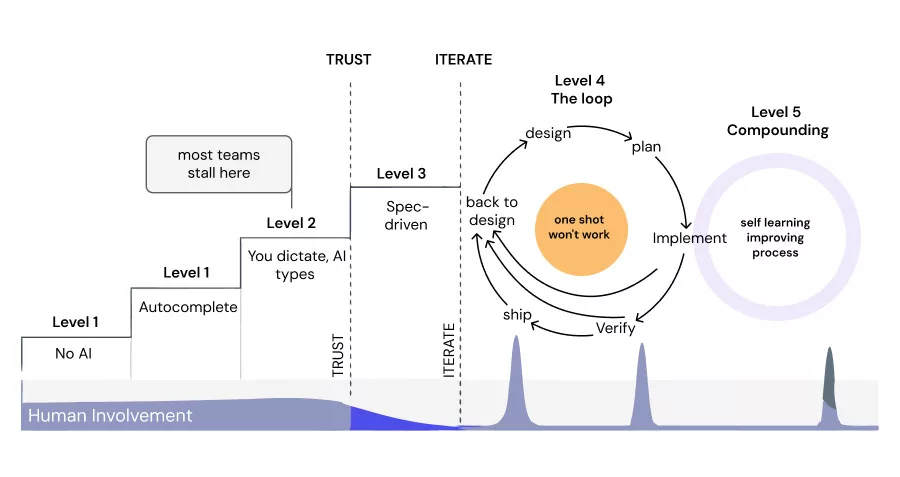
Keep cognitive load low. Human focus is your scarcest, most expensive resource. You have to accept that no engineer can realistically review every single line of agent-generated output.
The design challenge is keeping the human in the loop mainly for the points that are critical (or “load-bearing” as Claude likes to say):
- Critical design decisions, like architecture, APIs, data flows, and error handling.
- Critical code sections, like defining interfaces, components, files.
- Product requirements: aligning on the “why” and the “what.”
- Agent escalations: when an agent hits an unexpected roadblock mid-flow and needs direction.
- Judgment gates: agents make mistakes, so you still apply engineering judgment and doubt.
- Learning: you won’t know the codebase as intimately as before, but you still need to stay aligned with the high-level architecture.
You have to learn to defer the rest. Once the spec is properly defined, and the engineer is heavily involved in it, let the agent handle the raw code and the small implementation details. For many engineers it requires a shift from being coders towards architects and project managers.
But deferring requires trust and intuition, and trust has to be earned. You earn it by covering the logic with automated tests that check the right behaviour, involving the engineer on the design, giving agents highly focused tasks with clear definitions of done, and translating dense text into visuals. Diagrams, HTML mockups, and tables are far easier for a human to absorb than walls of markdown.
Problem-First Requirements, Brainstorm and Design
Requirements anchor on the problem, not the solution. Many builders and engineers default to writing requirements as a step-by-step recipe for one specific solution. Product managers fall into the same trap, baking implementation details into the ticket.
Good quality requirements can contribute a lot for the success of the process. Every decision and opinion along the way can be grounded against the requirements. Both when brainstorming and also when verifying the final solution.
When requirements are solution-focused, the whole SDLC overfits them. Your agents will fight tooth and nail to implement the exact, narrow solution you drafted, even if it’s fundamentally flawed. Maybe that solution is too complex. Maybe it misses the actual problem entirely.
Instead, use AI to help you find the best solution by keeping requirements strictly focused on the problem, on the customer experience, and implementation-free.
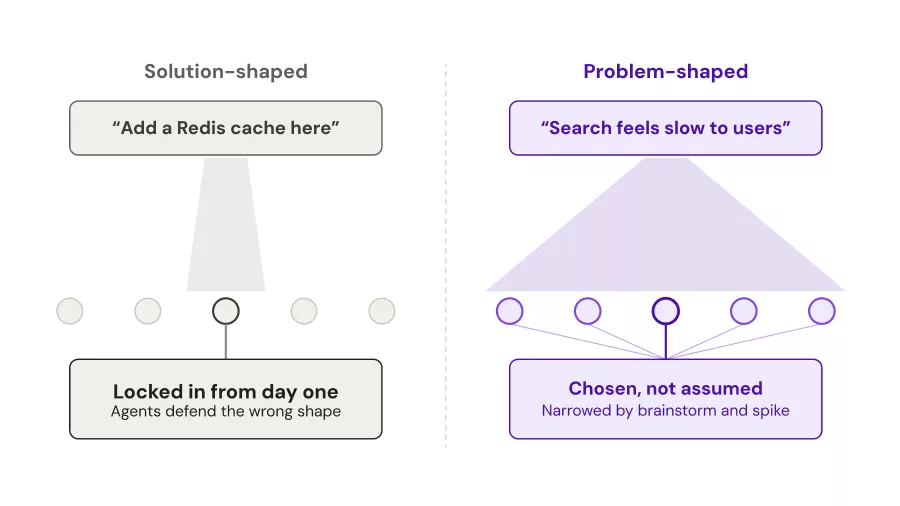
At Backline, we have a dedicated requirements SDLC phase, where our PMs and designers define high-level requirements scoped to the problem space, and the later engineering phases of the workflow consume those artifacts automatically. It uses sub-agents to enforce they are scoped around problems and not solutions, with a human eventually reviewing it. We believe it’s arguably one of the most critical steps of the process.
Brainstorm to explore unknown unknowns. Using agents just for writing code is a waste of their capabilities. They can be great brainstorming partners. Give them focused context, ask them to interview you, provide them with research capabilities, and they can transform from junior devs to a senior engineer with twenty years of experience.
And when the process ends, because the engineer ended up being involved in building the approach, it’s now much easier to review the final result. But in brainstorming and design, as in real life, sometimes you just don’t know what you don’t know.
A few years back, I worked at a company that introduced me to the concept of a SPIKE: you have an idea for an approach, but before implementing it, you run a short, focused prototyping session to surface the unknowns. Usually this involves writing some code to validate.
A SPIKE might prove your approach works really well, or it might force you to step back. It can run and validate your solution with real figures, providing meaningful insights that neither you or the LLM could foresee in advance. Either way, it’s far cheaper to fix a design defect during a SPIKE at design than to patch it after shipping to production. And code is cheap, so once again, no excuses 🙂
At Backline, we have a dedicated SDLC phase for technical brainstorming and exploration. The agents explore and research, and bring the engineer to the picture on important checkpoints and clarifications. Together, they explore solutions and build a high level design approach.
Designing the solution. After you brainstorm and come up with an approach, you usually take that into a high-level system design. We’ve found this part to be tricky to get right, and had a few bitter lessons around it.
At first we started by having a dedicated design phase aimed to explore and draft a design doc to cover all components, interfaces, data flows, error handling, security, and a bunch of other gates. After some mileage we discovered a few issues:
- With large and complex tasks, often it missed a lot of important details. With small and simple tasks it worked pretty well, but it introduced a ceremony that took considerably longer and we were not sure it was worth it.
- Adding more responsibilities to a dedicated design phase often ended up with a solution that was much more complex for unnecessary reasons, even for small and simple tasks.
- Often implementation details snuck into the design. Sometimes even whole code snippets. This caused the implementation to overfit around it, even if wrong.
- The design doc often got too long to be reviewed/read by a human.
- Engineers complained they don’t have any control about the code design, and while the design looks good, the code kept being a mess.
We concluded with a feeling we couldn’t trust the LLM to properly do a design in a single pass, so we ended up splitting the design into 2 parts:
- High level system design: A deliverable high level design. Data flows and access patterns, APIs, e2e testing.
- Increment high level code design: Once we have the high level system design, we divide it into increments. Each increment is an implementation unit and is designed separately. Increments design is closer to the code level: Components, interfaces, files, error handling, unit & integration testing.
Once the system and the code level design is defined clearly, the agents take that forward into implementation.
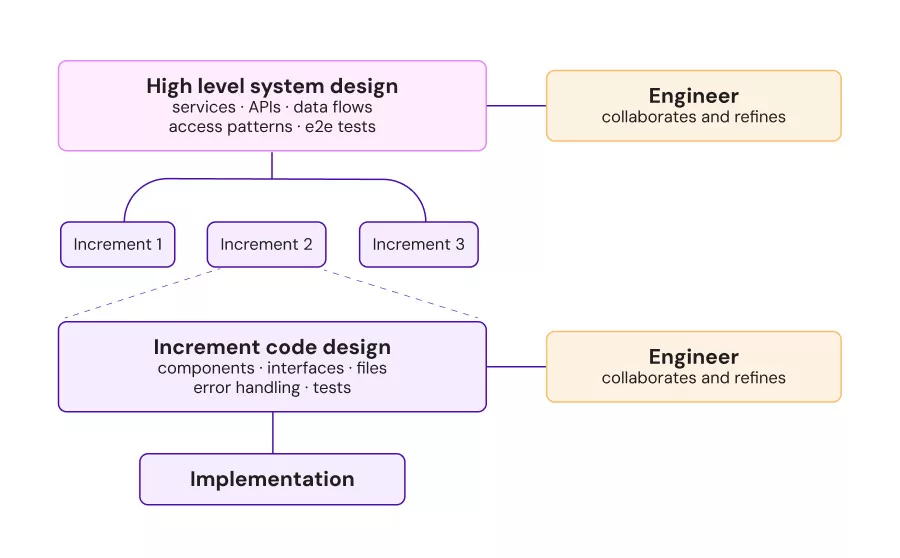
This seems promising so far, but we still explore the surface to find the right balance between agent autonomy in the design to involve the user’s judgment. Going heavy on visuals, diagrams, HTML, seems to be the way for getting the reader’s attention.
Context Engineering, State Management & Session Splits
Split your sessions (and your personas). It’s easy to miss: you cannot run a reliable SDLC inside a single, continuous LLM chat session. Long, unbroken sessions hit two major failure modes:
- Context window bloat. The window balloons, forcing you to choose between pushing into the model’s “dumb zone” (worse performance, higher token costs) or a lossy compaction that drops the exact details you need.
- Role confusion. Expecting one LLM to act as a top-tier product manager, software architect, coder, and QA engineer in the same session, carrying the identical context history, yields mediocre results across the board.
I can’t stress enough how important it is to get familiar with context failure modes and context engineering. You will fall behind if you bloat and abuse your context. You have to creatively build your SDLC around it.
To cope with context failure modes, we built a workflow with distinct phases and handoffs. Each phase gets a dedicated persona, highly specific responsibilities, and isolated context. Each phase reads its inputs from files and writes its outputs back to files. Those files act as the persistent state, so when a session gets too bloated or goes off the rails, you can resume from a known-good checkpoint.
At Backline, we also use custom hooks to monitor our context window usage, and inject hints into the session when it’s time to hand off and restart.
Isolate tasks. Don’t let an LLM design, brainstorm, and implement a massive feature in one go. Scope the high-level task first; when you move to implementation, break it into tiny, isolated sub-tasks with clear definitions of done.
Iteration, Review, and Observability
It’s a feedback loop, not a waterfall. A lot of the AI SDLC frameworks out there end up repackaging waterfall development with a new label. But the same as in the pre-LLM days, you’ll design a feature, begin building, and hit an unforeseen obstacle. Time to go back to the drawing board, except your SDLC doesn’t support that.
Your workflow has to support feedback loops. When an agent hits a roadblock, it needs to escalate: flag a design gap, report a deviation from the plan, or push a question back to the product team. Recovery like that should happen through clean state files, not inside a bloated, confused chat window.
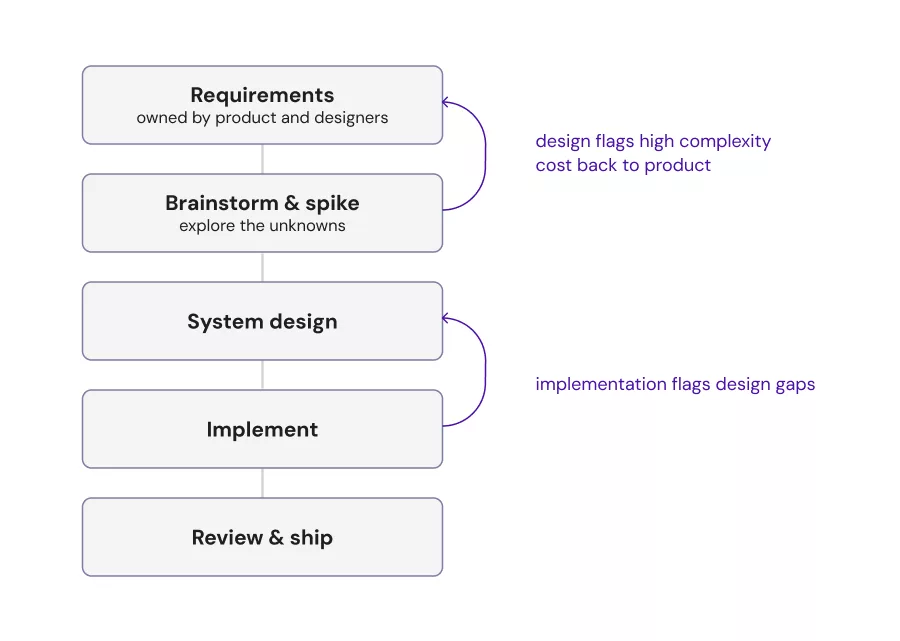
At Backline, our SDLC allows you to escalate back and forth between phases. Sometimes it even escalates between different stakeholders – Engineers find out a requirement adds a lot of complexity, they can flag it to a product persona to consider an alternative.
Throw tokens at the problem. Surround your workflow with verifiers, reviewers, critics, and simplifiers, even when they feel redundant. Each specialized pass acts like a fresh set of eyes, catching subtle logical issues that a single agent, deep in the implementation context, would miss. There is a tradeoff that involves cost and time. Find the sweet spot, try to focus these agents on the places that are the most critical. An agent finding & fixing a design defect might save you hours of engineering if discovered after implementation. And much worse if that got to production.
Capture the decision log. Before LLMs, the architectural source of truth lived in the code and in developers’ heads. Why did we choose Redis over Postgres? You had to ask around or hope an outdated design doc existed somewhere.
In an AI-driven SDLC, your design doc becomes something more than an intermediate step: a machine-readable log of decisions. A future agent can read that log when brainstorming, and spot that it’s about to make a decision that overlaps with yours. You also want these artifacts to be global, not repo-specific. At Backline, we host them in a dedicated git repo that every SDLC flow can access, across repos.
Make the flow highly observable. An AI SDLC is non-deterministic and highly opinionated, which makes it hard to get right. A few challenges you’ll bump into:
- It’s opinionated. What works for you may not work for others. Some people are comfortable spending most of their time on the design; others prefer a more “prototype code-first” approach.
- It’s non-deterministic. Because it’s driven by AI, outcomes vary from run to run, and the experience itself matters. Testing or evaluating human experience is hard, so you end up running it manually, over and over, across different cases. Doing that well takes real time and effort.
- Feedback is hard to collect. Some people are glad to share it. Others go silent, and you’re left guessing why.
Because of this, you can benefit from building deep observability into the core of your tooling. Bake feedback collection directly into the workflow so you can compound team learnings and continuously refine your agent prompts and system constraints. At Backline, our workflow reports these artifacts automatically as part of the process.
Build skills for production troubleshooting. Things go wrong in production. A customer complains. An on-call alert late at night. You’d rather not spend your time manually looking and correlating logs, traces, temporal workflows to build the bigger picture and the root cause. Build a skill that represents how a senior engineer in the team would approach that. Have it progressively discover references and guidelines to help it do the job faster and more efficiently. In some cases, you can even take it further from root cause to creating a PR fix for you to review.
Closing the Loop
Address the new bottleneck: code review. For any team adopting AI agents, code review becomes the ultimate bottleneck. Humans can’t read at the speed agents write. To scale, you have to accept that a human won’t review every line of code. But you also shouldn’t assume code is not important to review anymore.
To keep standards high without slowing down, consider these strategies:
- The guided tour. Use an agent to walk the human reviewer through the pull request, highlighting the critical changes, components, interfaces, data-flow changes, and architectural touchpoints with visual diagrams. The reviewer can ask questions and explore from there, a far lighter cognitive lift than reading raw diffs.
- Reviewer agents. Run strict, specialized critic agents to catch bugs, style issues, and security flaws. They can be noisy, but they catch the issues that matter and reduce human fatigue.
- Smaller PRs. Smaller PRs don’t solve the bottleneck on their own, but they make it more manageable. Stacked PRs may re-gain popularity, worth reading up on if you haven’t already.
Shorten the loop. High-performing engineering teams obsess over short feedback loops. Don’t wait for staging or CI to run end-to-end tests. Your agents need to be able to spin up your entire stack, locally or in an ephemeral cloud environment, to verify their own work e2e.
At Backline, we use Tilt for local development. One script, five minutes, and our entire environment is running locally with minimal mocks. Our agents get direct access to local APIs, pod logs, databases, and our observability stack. You can even have them take screenshots or screen recordings of UI changes and attach them directly to the PR.
You Can’t Vibe-Code Your Way Out of CVEs
So let’s get into what we actually build at Backline.
When people ask us to “fix a vulnerability” or “remediate a CVE,” they often assume it’s a simple, isolated task, an agent that bumps a dependency or slaps on a quick patch.
But asking a coding agent to “fix this CVE” right out of the gate is the exact same mistake as asking it to “implement this feature.” It’s vibe-coding. The agent will write a patch that compiles, passes basic CI, and promptly breaks production anyway, or introduces unnecessary complexity.
Why? Because it was wrong about the context it was patching into. Nothing in the workflow forced it to understand the broader system architecture. It might do a naive version bump that silently changes an API the codebase depends on, or ship a fix that ignores how the vulnerable function is actually reached.
At Backline, we treat vulnerability remediation as software development. It deserves a similar SDLC discipline, planning, and the same refusal to vibe-code. So the same phased pipeline applies here too, each stage with its own persona, focused responsibilities, and isolated context:
- Analysis. Frame the vulnerability and gather context. Is the vulnerable code path actually reachable? What components depend on it?
- Planning. Design the optimal remediation path for your specific environment, instead of grabbing the first generic patch that silences the scanner.
- Implementation. Write the production-ready, context-aware change.
- Verification. Validate the change against the real, running system to catch regressions before it ever reaches a human reviewer in a PR.
By enforcing a rigorous, multi-stage SDLC, the underlying model matters less and less. The workflow itself guarantees the quality of the output.
What’s Next?
Our in-house SDLC harness has helped our product managers, designers, and engineers ship faster while keeping our production bar high.
We haven’t solved every open question in the AI SDLC space, but we’re learning and improving every day. In upcoming posts, we’ll do a technical, under-the-hood deep dive into our harness architecture so you can apply these principles on your own team.
Until then, my honest advice: skip the vibe-coding, build the workflow, and bring your team into it with you. It’s a marathon of learning and experimentation and you’ll better not be left behind.