
A ticket assigned to a team is a ticket assigned to nobody. Backline now brings each remediation to the people who need to act on it, in Slack, Microsoft Teams and Jira, and stays in the conversation until the finding is gone.
How many of your critical findings sit right now in a ticket owned by a team that split up two reorgs ago? Detection keeps getting faster. The handoff between “we know about it” and “it’s gone” still runs on people chasing people.
A scanner finds a vulnerable package and someone files a ticket. The ticket lands in a backlog nobody watches, and the SLA clock keeps running. Even a trivial fix needs someone to pick it up. So your security team ends up as a routing layer between a dashboard and the people who can act.
Backline now handles that routing as a member of your security team, working the backlog on your team’s behalf and inside the policies you set. When a remediation is ready, whether it’s a pull request Backline opened or instructions a person has to carry out, Backline finds the right people and reaches them in the tools they already use. It answers their questions, follows up, and escalates when nothing moves.
Engineers, DevOps and platform teams never need to open the Backline platform to take part.
Backline meets stakeholders where they already work
Nobody outside the security team logs into a security tool by choice. So Backline goes to them.
In Slack or Microsoft Teams, Backline messages a named person with the fix attached and one clear ask. In Jira, it opens a ticket in the team’s own project, assigns it and keeps it current.
Each message carries what the person needs to act: what the issue is, how urgent it is, what Backline already did, what’s left for them, and links for anyone who wants detail.
Every message also opens a conversation. Reply in the thread and Backline reads it, answers and acts on what you said, the way a colleague would.

A pull request when it can, step-by-step instructions when it can’t
Backline groups related findings so one remediation resolves the whole set, like the vulnerable dependencies in a service and the base image its containers share, or the misconfigured resources in one cloud account.
For each group, Backline opens a Jira ticket or updates the existing one. It keeps the ticket in step with the work: remediation prepared, PR open, checks passing, review pending, merged, verified, gone.
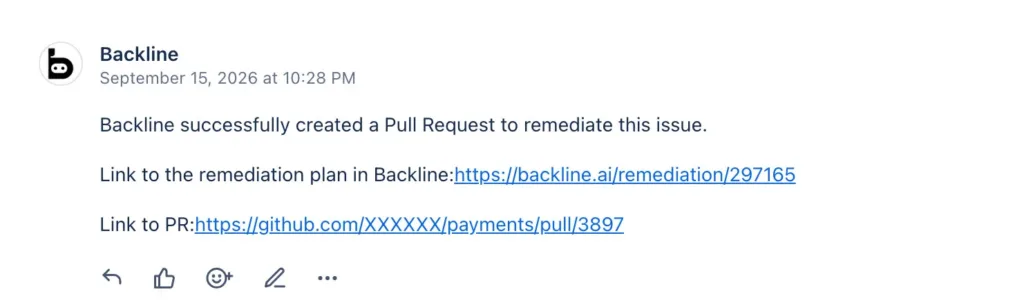
When the fix lives in code, Backline opens the pull request itself, and the owner’s job is to review and merge.
When a code change can’t resolve the issue, Backline delivers an Assisted Fix: a ticket with detailed instructions specific to your environment. Nobody has to begin from a CVE ID and a search engine.

Your priorities decide the channel
A tool that pings people about everything is a tool people mute. So Backline doesn’t send a direct message for every finding.
Your security team decides what matters, whether that’s keeping SLAs intact or cutting time to remediate, and which environments and applications come first. Backline works toward those priorities and matches its outreach to them.
Backline mentions the owner of a top-priority fix by name in Slack or Teams. A fix further down the list waits in its ticket until it needs attention.
You set daily and per-person limits, quiet hours and weekend rules once, and Backline follows them. A bad week for the scanner never turns into a bad week for your engineers.
The right people, found for you
Team-level assignment is where fixes stall. Backline sends each remediation to the people who can act on it, using ownership signals your organization already has.
Those signals include the code owners for the affected files, the repository maintainers, the owner of the cloud resource and the team responsible for the application.
Backline also lines up who comes next if the first person doesn’t respond, so a fix has a path forward before it stalls.
Your ownership records and policies decide who gets contacted and when. Backline writes the message.
Your team keeps control of the rules, and Backline handles the volume. With recipients coming from your own records, Backline can work a whole backlog under the policies your team approved, with no sign-off needed on every send.
Every message opens a conversation
Ask “how bad is it?” and Backline answers from the finding itself: the risk score, the affected repository and package or cloud resource, and the fixed version or target configuration.
Ask why you got the message, and Backline shows you the ownership record it used.
Say “done” and Backline checks before it believes you. It verifies the finding and the remediation, and confirms resolution only when the data agrees.
Say “not before the next sprint” and Backline logs the commitment, then comes back on that date with no nagging in between.
If you’re the wrong person, say so and name the right one. Backline moves the conversation to them, flags the ownership gap so your team can fix the record, and leaves you out of threads about services you don’t own.
You can also ask Backline to loop someone else in.

When nobody answers
Silence is how security tickets usually fail, so Backline plans for it.
If the first contact doesn’t reply within the follow-up window, Backline moves to the next person on the list: the owning team’s manager, then the application’s technical contact.
Each step opens a fresh thread with full context, and Backline never asks the same person twice in one day.
If Backline can’t find anyone, it posts in the team’s channel asking for someone to pick up the fix. It also marks the fix as stalled, so everyone can see it instead of letting it age in a backlog.
Backline closes a remediation once it verifies the finding is resolved. An open ticket or a confident “handled” in Slack doesn’t count.
What changes for your team
Your security team gets back the hours it spent chasing owners, and puts them toward the work that reduces risk.
Code and Cloud owners get one message in the tool they already use, with the fix or instructions attached and a clear ask they can answer like they’d answer a colleague.
Leadership sees SLAs hold, a ticket trail that reflects what really happened, and a backlog that shrinks instead of piling up.
Slack, Microsoft Teams and Jira integrations are available today for Backline customers. Book a demo to see Backline work through your own backlog.